



Simplicity AI SDK
Accelerate IoT development with the power of AI. Simplicity AI SDK is Silicon Labs’ next-generation development suite that brings engineers and AI agents together to build, debug, and deploy IoT applications faster than ever.
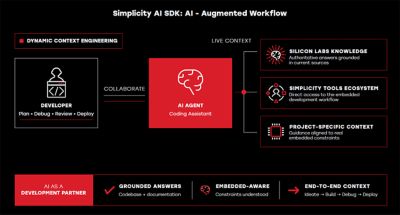

Simplicity AI SDK connects developers and their AI coding assistants to the Simplicity Ecosystem, providing the Silicon Labs-specific context, tools, SDKs, documentation, project context, and connected hardware needed for embedded development. This enables developers to create and configure projects, debug applications, analyze networks, migrate code, and find technical information with context-aware assistance throughout the development journey.
Simplicity AI SDK provides structured access to development capabilities, including project configuration, device management, debugging, network analysis, code migration, and knowledge base search.
- Overview
Overview
Built for collaboration
AI isn’t just a coding tool — it’s your development partner.
Simplicity AI SDK gives both humans and intelligent agents shared context, so they can:
Generate and refine application code
Integrate and configure components
Detect and resolve issues instantly
With AI handling the repetitive work, developers focus on design, creativity, and innovation.
Smarter by design
At its core, dynamic context engineering keeps your project, SDK, and device in sync — enabling AI to understand exactly what you’re building and act accordingly. No more endless searches or fragmented documentation. Just faster progress.
- Getting Started
Getting Started
Download the Simplicity Installer for Installing Simplicity AI SDK
The Simplicity Installer provides a guided setup experience for installing the Simplicity AI SDK, along with Simplicity Studio 6, SDKs, and other development tools so you can get up and running quickly.
Simplicity AI SDK Getting Started Guide
Explore the documentation below for an overview of the Simplicity AI SDK's architecture, prompting best practices, and step-by-step installation guidance.

- Community & Support
Community & Support
Join the Community & Get Support
Post questions or browse discussions on the Silicon Labs Community. Check out developer blogs, application notes, and training videos.