


SLWSTK6050C
MSRP $379.00
MSRP $379.00

OVERVIEW
Kit Contents
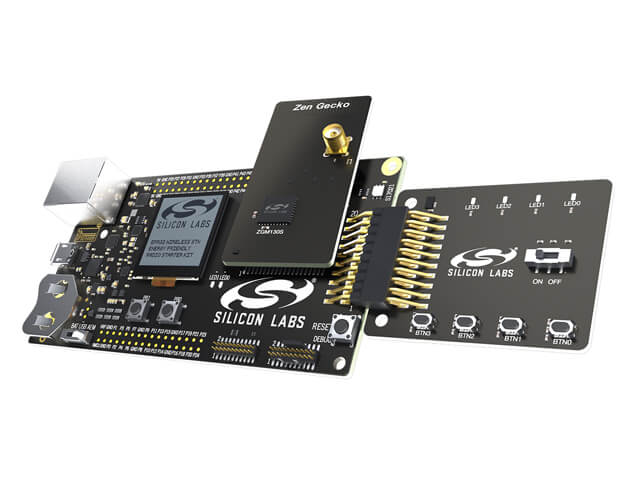
- 2x BRD4002x Wireless Pro Kit Mainboard
- 2x BRD4207A Z-Wave 700 – ZGM130S Long Range Radio Board
- 1x BRD2603A ZGM230 +14 dBm Dev Kit Board
- 2x BRD8029A Buttons and LEDs Expansion Board
- 1x UZB-S (ACC-UZB3-S) UZB-S USB stick network sniffer
- 3x 868-915 MHz Antennas
Kit Features
- Z-Wave 700 SiP module Radio Boards to start your development
- Z-Wave Application Framework and pre-certified common end device application code
- Expansion header allows easy expansion and direct integration with Z-Wave Application Framework
- Z-Wave ZGM230-DK2603A to get started with your gateway development
- Pre-built Z/IP* and Z-Ware binaries allow for easy gateway development at your preferred API level
- Supports Z-Wave Long Range
Simplicity Studio Features
- Auto-detection for lab evaluation, software development and sample applications
- Z-Wave Application Framework
- Certified Application Code
- Z-Wave Sniffer
- Z-Wave PC Controller
- Energy Profiler
*The Z/IP gateway is a free reference design intended for development and demonstration purposes only. It is provided as is, with no warranties. Customers are advised to conduct security and compliance testing of all gateways during the product design process.
GETTING STARTED
Step 1: Download and Install Simplicity Studio Version 6
Get up and running quickly with precompiled demos, application notes, and examples. Use advanced tools including energy profiling to optimize your MCU application. Choose your software package below.
TECH DOCS
SOFTWARE & TOOLS
COMMUNITY & SUPPORT
Knowledge Base Articles
Browse our knowledge base articles for information about specific products.
User Forums
Browse technical questions, share your ideas, and learn more about our latest solutions.
Z-Wave Certification
Certification of devices to Z-Wave standards is required.
Questions? You're in the Right Place.
Silicon Labs has an active, knowledgeable user community of engineers and developers that are enthusiastic about solving problems.